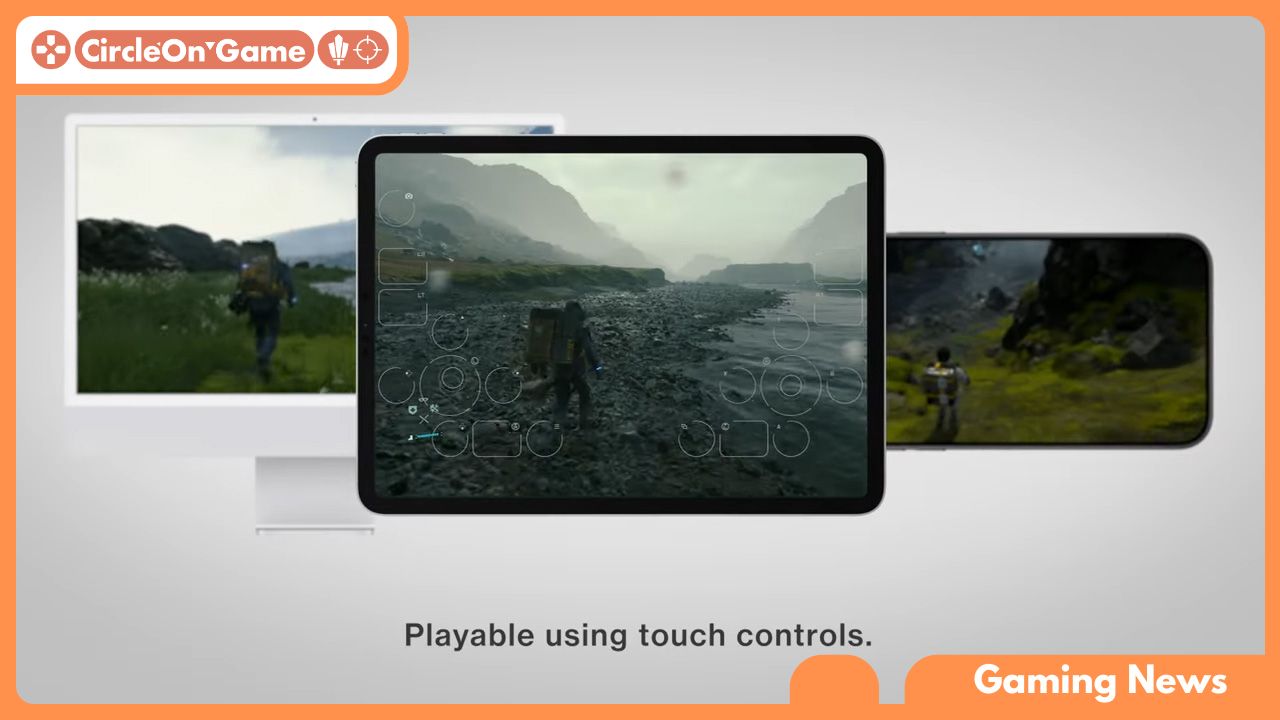

As the line between mobile and console gaming continues to dissolve, Hideo Kojima’s seminal work, Death Stranding, has made a fascinating transition to the high-performance iPad Pro. Initially captivating players on PlayStation and PC with its profound narrative and hauntingly beautiful environments, this iconic title has piqued the interest of both fans and those new to its world. The question arises: how does this deeply engaging experience fare on Apple’s premier tablet? In this piece, we will dissect the performance intricacies, visual quality, and gameplay mechanics of Death Stranding when played on the iPad Pro, evaluating whether it successfully retains the spirit of its original platforms or encounters challenges during its migration. Join us as we navigate through both the rugged landscapes of the game and the performance indicators that reveal the depth of this cross-platform journey.
The Visual Majesty of Death Stranding on iPad Pro
Stepping into the mesmerizing world of Death Stranding on the iPad Pro immerses players in surreal settings that seamlessly merge reality with artistic design. The game features painstakingly developed locations, from desolate peaks to glowing beaches, superbly displayed with a clarity that animates each frame. The iPad Pro’s exceptional Liquid Retina display amplifies every detail, offering an immersive environment where dynamic water reflections and shifting weather conditions inspire awe. The graphical excellence is not merely visual; it plays a vital role in narrating the story, portraying feelings of solitude and the overarching significance of each journey.
Every facet, from the rugged terrain textures to the fine details of cargo and gear, appears vibrant and lifelike, enriching the exploration experience. Thanks to the advanced M1 chip, Death Stranding operates fluidly, allowing players to navigate its stunning yet challenging landscapes effortlessly. The game’s atmospheric lighting and shadow interactions create a mood fitting its complex narrative. With each step echoing alongside an emotionally resonant soundtrack, players find themselves immersed not just as spectators but as integral participants in a vibrant tableau that evolves with every endeavor. This harmonious blend of visual artistry and gameplay transforms the iPad Pro into a compelling playground of adventure that encourages players to engage with the themes of connection and resilience within its elaborately constructed universe.
Read More: 10 Must-Play Apple Arcade Games of 2024!
Performance Analysis: Examining Gameplay Fluidity
Analyzing the smoothness of gameplay in Death Stranding on the iPad Pro reveals an intriguing dynamic between hardware power and software refinement. With the impressive capabilities of Apple’s M1 chip, the iPad Pro offers remarkable performance that facilitates fluid navigation through vast terrains and shifting climates. Frame rates consistently remain robust, only slightly fluctuating during the most graphically intense moments, ensuring complete immersion in the narrative and the captivating world conceived by Hideo Kojima. Whether traversing mountains or maneuvering through rain-drenched areas affected by timefall, the gameplay experience remains uninterrupted, heightening the significance of cargo delivery missions that are central to the game.
Additionally, the blend of touch inputs with classic gaming controls adds a unique dimension to the gameplay, creating a more hands-on interaction with the action. The intuitive gestures enhance the player’s ability to navigate the environment effectively while preserving a deep sense of immersion. This combination of control methods guarantees responsive and purposeful actions, even during intricate segments involving BTs or managing delicate cargo. The fusion of sharp graphics and swift load times enriches the overall experience, demonstrating that the iPad Pro transcends mere portability, positioning itself alongside traditional consoles to deliver a rich appreciation of Death Stranding’s hauntingly beautiful realm.
Managing Battery Life and Temperature During Extended Gameplay
As players delve into the expansive realms of Death Stranding, it becomes vital to evaluate how the iPad Pro handles battery preservation and heat production during long gaming sessions. The stunning visuals leveraged by the device’s robust hardware lead to intricate environments and detailed character designs. While the iPad Pro excels at rendering demanding graphics, testers noticed a clear increase in battery usage, particularly during demanding scenes that test the GPU to its limits. The optimization efforts appear to have struck a balance—although some battery drainage is unavoidable with such a workload, moments of lower intensity serve to help regulate energy consumption, extending playtime before needing a recharge.
Thermal management remains critical for ensuring performance consistency throughout this epic journey. When temperatures rise, the iPad Pro employs a well-designed cooling system to mitigate excess heat, preventing any throttling that could disrupt the seamless gameplay experience that users come to expect. While slight temperature increases are noticeable, the device remains comfortable for extended use, allowing players to explore the intricate landscapes of Death Stranding with minimal interruption, providing a smooth and captivating experience that skillfully blends power and usability.
Enhancing Your Portable Gaming Experience
To achieve a smooth experience while exploring the vast environments of Death Stranding on your iPad Pro, optimizing settings is crucial. Begin by adjusting the resolution and graphical settings to find the ideal compromise between visual quality and performance. The iPad Pro shines when users select a resolution that maximizes visual clarity without overwhelming the GPU. Make full use of the device’s ProMotion technology to enjoy incredibly smooth frame rates—this can significantly enhance the gaming experience, making the act of delivering cargo fluid and engaging.
Additionally, consider personalizing the in-game control settings to improve touch sensitivity. The intuitive nature of the iPad Pro’s screen can be maximized by tailoring button configurations and gestures to suit your gaming style. Proactive use of accessories like the Apple Pencil or a game controller can enhance accuracy, making even challenging tasks more manageable. By thoughtfully adjusting these parameters, players can fully appreciate the detailed mechanics of Death Stranding, immersing themselves in its elaborate narrative and stunning visuals with unmatched ease and enjoyment on this portable powerhouse.
Final Thoughts
As we conclude our exploration of Death Stranding on the iPad Pro, it becomes apparent this innovative title has successfully adapted to Apple’s powerful tablet. With its eye-catching graphics and intricate mechanics combined into a seamless experience, the iPad Pro stands as a capable medium for Hideo Kojima’s ambitious creation.
Players can anticipate impressive performance that rivals its console versions while enjoying the unique advantage of journeying anywhere they desire—further narrowing the divide between gaming and mobility. As we navigate the vast terrains of this post-apocalyptic narrative, the iPad Pro provides a stunning platform for exploration, making every delivery and connection feel more intimate than ever.
While one might contend that the experience is best suited for larger displays, the iPad Pro confidently offers a potent combination of hardware and software optimization tailored to enhance gaming journeys. As technological advancements push the gaming industry into new realms, experiences like Death Stranding illustrate the potential of mobile gaming—not merely as a secondary option, but as a formidable platform for storytelling and creative expression.
So whether you’re a long-time fan of Sam Porter Bridges or a rookie ready to step into the shoes of a Homalink, the iPad Pro beckons you to navigate its rich storyline. You might discover that the adventure holds as much significance as the ending, reminding us all that within gaming, connections manifest in various forms—both in the digital world and beyond.